はじめてのWordPress入門講座【基礎知識・基本的な使い方・トラブル対応】

吉報!Instagramが複数アカウントの切り替えに対応するぞ!

待ちに待った嬉しいニュースですね!インスタグラムが複数アカウントの切り替えに対応するそうです!

FacebookページTwitter、Google+1、YouTubeも複数アカウントを一元管理できますが、Instagramは複数アカウントに対応していませんでした。

Instagramで複数アカウントの切り替えが簡単にできる

これまで、プライベート用アカウントと企業用アカウントなどを使い分けるには、その都度、ログインし直す必要がありました。

今後(Instagram version 7.15から)は、その面倒がなくなり、iPhoneやAndroidのアプリで複数アカウントを管理することができるそうです。

参考(英語):Account Switching: Now Available on Instagram Instagram Blog

管理したいアカウントを「追加」するだけ
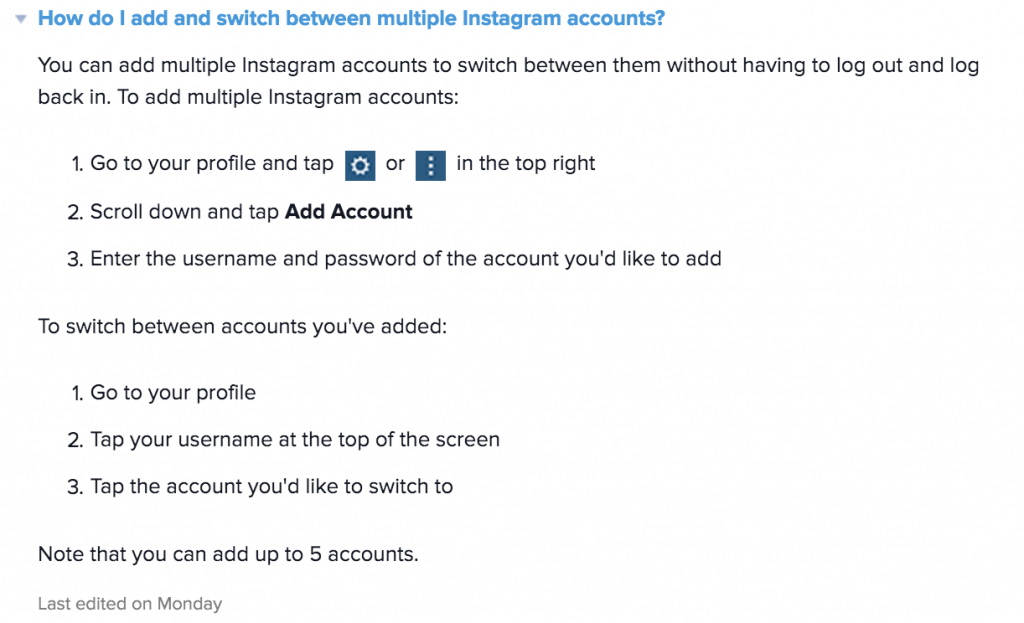
FacebookでもTwitterでもそうですが、1つベースとなるアカウント(個人アカウントなど)に、管理したいアカウントを紐付けることで、一元管理ができるようになります。

ログインをし直す手間なく、複数アカウントの切り替えができるようになると、より企業アカウントのインスタグラム利用が加速するかもしれませんね。

自分も切り替えが面倒くさかったので、凄く助かります。


Fatal error: Uncaught wfWAFStorageFileException: Unable to save temporary file for atomic writing. in /home/webmaster-d/homepage-reborn.com/public_html/renewal/wp-content/plugins/wordfence/vendor/wordfence/wf-waf/src/lib/storage/file.php:34 Stack trace: #0 /home/webmaster-d/homepage-reborn.com/public_html/renewal/wp-content/plugins/wordfence/vendor/wordfence/wf-waf/src/lib/storage/file.php(658): wfWAFStorageFile::atomicFilePutContents('/home/webmaster...', '<?php exit('Acc...') #1 [internal function]: wfWAFStorageFile->saveConfig('livewaf') #2 {main} thrown in /home/webmaster-d/homepage-reborn.com/public_html/renewal/wp-content/plugins/wordfence/vendor/wordfence/wf-waf/src/lib/storage/file.php on line 34