はじめてのWordPress入門講座【基礎知識・基本的な使い方・トラブル対応】

YouTubeライブで自分の好きなカメラ映像を選べるようになる?!

YouTubeライブで面白い試みが動いているようですね。ミュージックライブで自分の好きなアングルを選べるのは、視聴者として楽しい!

カメラ映像を切り替えることが出来る

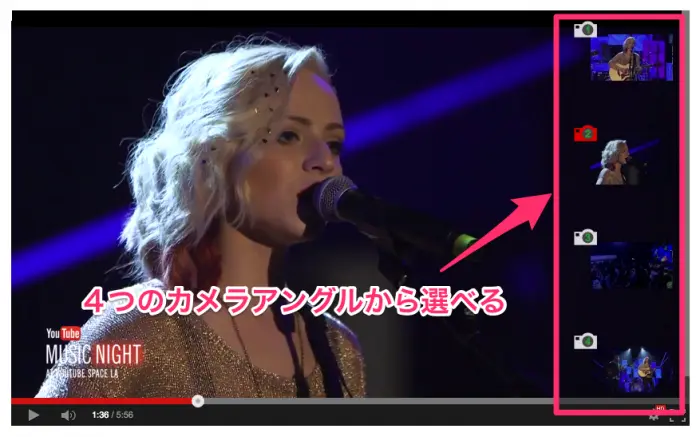
Madilyn Baileyという歌手のYouTubeライブでライブ中に視聴者が撮影しているカメラを選べる(スイッチングできる)試みが行われました。

YouTubeライブで視聴者がスイッチングできる

YouTubeライブの映像の右側に4つのカメラ映像が並んでおり、視聴者は好きな時に好きなカメラの映像を選択(カメラの映像を切り替え)することができます。

普通はスイッチングは製作側でしているため、視聴者に選択の権限はありませんが、視聴者が自分が見たいアングルでライブを楽しめるのは良いですね!

百聞は一見にしかず!とにかく自分自身で体験してみてください!
ライブ動画を見る→Madilyn Bailey – YouTube


Fatal error: Uncaught wfWAFStorageFileException: Unable to save temporary file for atomic writing. in /home/webmaster-d/homepage-reborn.com/public_html/renewal/wp-content/plugins/wordfence/vendor/wordfence/wf-waf/src/lib/storage/file.php:34 Stack trace: #0 /home/webmaster-d/homepage-reborn.com/public_html/renewal/wp-content/plugins/wordfence/vendor/wordfence/wf-waf/src/lib/storage/file.php(658): wfWAFStorageFile::atomicFilePutContents('/home/webmaster...', '<?php exit('Acc...') #1 [internal function]: wfWAFStorageFile->saveConfig('livewaf') #2 {main} thrown in /home/webmaster-d/homepage-reborn.com/public_html/renewal/wp-content/plugins/wordfence/vendor/wordfence/wf-waf/src/lib/storage/file.php on line 34